Segments vs Audiences
 mosesdinakaran@gmail.com
These terms are often used interchangeably, but there's a subtle distinction:Segment = The rule/definition (the logic)
- "Give me all customers who have an unpaid bill and haven't made a payment"
- It's like a SQL WHERE clause
Audience = The resulting group of people who match that rule
- The actual list of profiles: Alice, Bob, Carol, Frank, Grace, Iris
- This is what gets used in journeys and campaigns
In AEP, when you create a "segment definition," it automatically produces an "audience." Adobe has been migrating terminology from "Segments" to "Audiences" — so in the UI you'll mostly see Audiences.
2. Types of Audiences
a) Batch Audiences (Segment Builder)
- Evaluated periodically (once every 24 hours by default, or on-demand)
- Uses the Segment Builder UI with drag-and-drop rules
- Best for: campaigns, scheduled sends, large audiences
- Example: "All customers with unpaid bills" — evaluated daily
b) Streaming Audiences
- Evaluated in real-time as data flows in
- Profile qualifies/disqualifies the moment an event arrives
- Best for: time-sensitive triggers, journeys
- Example: "Customer just received a bill" — triggers instantly
c) Edge Audiences
- Evaluated on the edge network (CDN level)
- Ultra-low latency (milliseconds)
- Best for: same-page personalization, web/app experiences
For your capstone, you'll use Streaming for the journey trigger (react to events in real-time).
3. Segment Builder — How It Works
The Segment Builder UI has these components:
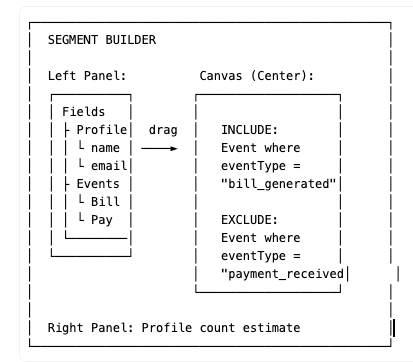
Key concepts in the builder:
- Attributes = Profile fields (firstName, accountStatus, churnRiskScore)
- Events = ExperienceEvents (bill_generated, payment_received)
- Include = Profiles that MUST match these conditions
- Exclude = Profiles that must NOT match these conditions
- Time window = "In last 30 days", "In last 7 days", "Any time"
4. Adobe Journey Optimizer (AJO)
AJO is the tool that orchestrates the customer experience — it decides who gets what message, when, and through which channel.
Core Components of AJO:
a) Journeys
A journey is a multi-step, automated workflow triggered by an event or audience qualification.
Trigger ──► Action ──► Wait ──► Condition ──► Action ──► End
Journey building blocks:
| Block | Purpose | Example |
|---|---|---|
| Entry | How profiles enter | Segment qualification, event trigger |
| Action | What to do | Send email, send SMS, send push, custom action |
| Wait | Pause | Wait 1 day, wait until specific date |
| Condition | Branch logic | If paid → exit, if not → remind |
| End | Exit point | Journey complete |
b) Channels (messaging)
AJO supports multiple channels:
- Email — rich HTML content
- SMS — text messages
- Push Notifications — mobile app alerts
- In-App Messages — messages inside your app
- Direct Mail — physical mail triggers
- Web — on-site personalization
c) Messages / Content
Each action uses a message template with:
- Subject line / body — static + dynamic content
- Personalization — using profile attributes like {{profile.firstName}}
- Content decisions — powered by Offer Decisioning
5. Journey Entry Types
Read Audience (Batch)
- Takes a pre-built audience and pushes all members through the journey
- Can be one-time or recurring (daily, weekly)
- Example: "Every day at 9am, push all unpaid-bill customers through the reminder flow"
Audience Qualification (Streaming)
- Triggers when a profile enters or exits an audience
- Real-time: as soon as profile qualifies, they enter the journey
- Example: "The moment a customer's bill is generated, start the payment reminder flow"
Unitary Event (Streaming)
- Triggers on a specific event for a profile
- Most real-time option
- Example: "When a bill_generated event arrives for CUST003, enter CUST003 into the journey"
For your capstone, you'll likely use Unitary Event (triggered by bill_generated) or Audience Qualification.
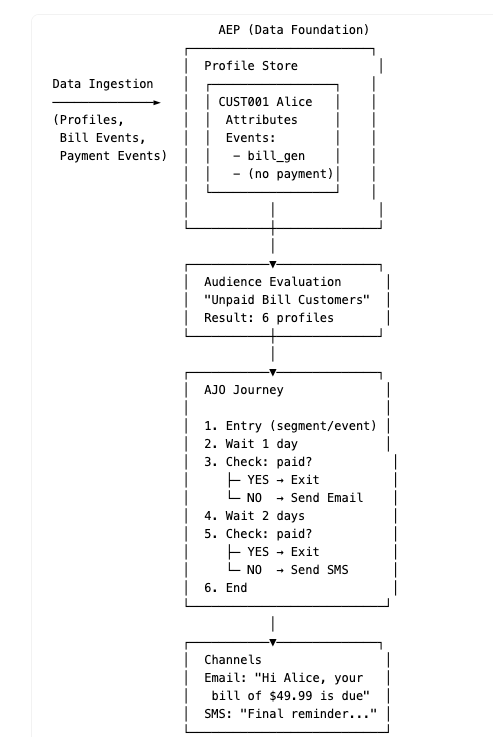
6. How It All Connects — Your Capstone Flow
Audience Compositions
When you click Create Audience in AEP, you see two options:
- Build rule — Segment Builder (what we discussed)
- Compose audience — Audience Composition
Here's the difference:
Build Rule (Segment Builder)
- Define rules based on profile attributes and events
- Example: "Customers where eventType = bill_generated AND no payment_received"
- Produces a single audience from raw data
- Supports streaming (real-time) evaluation
Compose Audience (Composition)
- Combines existing audiences using set operations
- Think of it as working with audiences as building blocks
- Does NOT read raw profile/event data directly — it works with already-built audiences
Composition building blocks:
| Block | What it does | Example |
|---|---|---|
| Audience | Start with an existing audience | "All Bill Generated customers" |
| Union | Combine two audiences (OR) | "Unpaid customers" + "High churn risk customers" |
| Intersect | Overlap of two audiences (AND) | "Unpaid customers" who are ALSO "High usage" |
| Exclude | Remove one audience from another (MINUS) | "All billed" MINUS "All paid" = Unpaid |
| Rank | Sort and keep top N profiles | Top 100 by churnRiskScore |
| Split | Divide into sub-audiences by percentage or attribute | 50/50 A/B test split |
| Enrich | Add lookup attributes from a dataset | Add offer details to each profile |
7. Key AJO Terms Quick Reference
| Term | Meaning |
|---|---|
| Journey | Automated multi-step workflow |
| Campaign | One-time or scheduled message blast to an audience (no branching logic) |
| Surface | Channel endpoint — email address, phone number, push token |
| Channel Configuration | The sender config (email domain, SMS number) |
| Personalization | Dynamic content using {{profile._acsultimatesupport.dinakara_cs_cust_firstName}} |
| Offer Decisioning | AI-powered system to pick the best offer for each customer |
| Throttling | Rate limiting to avoid overwhelming channels |
| Capping | Max messages per profile per time window |
| Consent | Respecting customer opt-in/opt-out preferences |